Showing posts with label Sql Server. Show all posts

Monday, 24 October 2016

SQL Service Restarts Time/TempDB Creation Time

As we all know tempdb will be recreated everytime when the SQL Server service restarts.

How do we know the timestamp of SQL Server service restarts/tempdb creation through query?

1) Using Dynamic Management View: (Not everyone will have this permission)

SELECT SQLSERVER_START_TIME FROM SYS.DM_OS_SYS_INFO

2) Whoever with Read Access can use the below query.

SELECT CREATE_DATE AS LAST_RESTART_TIME
FROM SYS.DATABASES
WHERE  NAME = 'tempdb'

(or)

SELECT CRDATE AS LAST_RESTART_TIME
FROM MASTER.DBO.SYSDATABASES
WHERE NAME = 'tempdb'

Monday, 29 August 2016

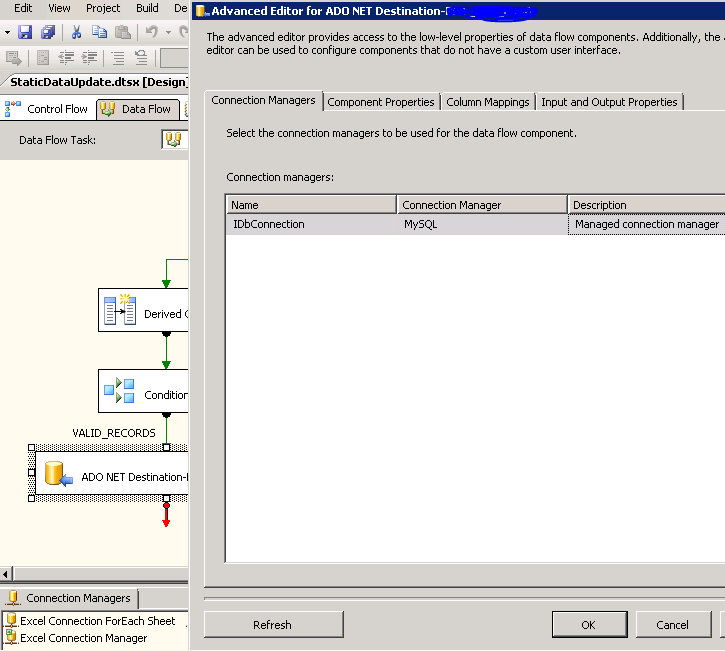
Refresh Table Changes made on DB to SSIS package Data Flow Items

Recently i came across a situation to add additional columns into the existing table, hence the change needs to be effected\changed in SSIS packages as well for the tasks which makes use of these tables.

In order to do that, Right Click->Show Advanced Editor..-> Click Refresh on the extreme left corner at the bottom of Show Advanced Editor window. Please refer the below screenshot of the same.


Wednesday, 2 March 2016

Drop Constraint of a column(s) in SQL Server


How to drop particular(FK OR UQ OR DF) constraint based on given COLUMN_NAME in SQL Server?

Key Note: 
Generally you will come across this situation when you don't create CONSTRAINT NAME on your own.
When you asked to drop "only one unique constraints" on a column of a table(assume that table has 'n' unique constraints on other columns as well) for a particular column(or for a set of columns), how do you do it when all the constraint names are system generated?

--Input for a single column: TABLE_NAME & COLUMN_NAME  

DECLARE @TABLE_NAME VARCHAR(100) = 'TRANSACTION_PARCEL' 
DECLARE @COLUMN_NAME VARCHAR(100) = 'fromdate' 
DECLARE @SQL NVARCHAR(max) = '' 

SELECT @SQL += 'ALTER TABLE ' + @TABLE_NAME 
               + ' DROP CONSTRAINT ' + constraint_name + ';' 
FROM   information_schema.constraint_column_usage A 
       JOIN sys.objects B 
         ON A.constraint_name = B.NAME 
WHERE  --B.TYPE = 'UQ' AND  
  A.table_name = @TABLE_NAME 
  AND A.column_name = @COLUMN_NAME 
GROUP  BY A.constraint_name 

PRINT @SQL 

EXEC Sp_executesql 
  @SQL 


----Input for multiple columns: TABLE_NAME & COLUMN_LIST

DECLARE @TABLE_NAME VARCHAR(100) = 'TRANSACTION_PARCEL' 
DECLARE @SQL NVARCHAR(max) = '' 

SELECT @SQL += 'ALTER TABLE ' + @TABLE_NAME 
               + ' DROP CONSTRAINT ' + constraint_name + ';' 
FROM   information_schema.constraint_column_usage A 
       JOIN sys.objects B 
         ON A.constraint_name = B.NAME 
WHERE  --B.TYPE = 'UQ' AND  
  A.table_name = @TABLE_NAME 
  AND A.column_name IN ('PARCEL_BSKEY','TRAN_BSKEY','TRAN_PARCEL_BALANCE_TYPE') 
GROUP  BY A.constraint_name 

PRINT @SQL 

EXEC Sp_executesql 
  @SQL

Note: Code can be customized to pull out particular keys as well (F - foreign key, D - Default constraint, UQ - Unique constraint, PK - Primary Key constraint)

Before you drop constraint of type PK, you need to drop FK's which falls upon this PK.